
Building a Shopify embedded app has become much easier thanks to Shopify’s official Remix and Node.js templates, App Bridge improvements, and the Shopify CLI. Many of the repetitive setup tasks that developers once had to handle manually are now automated.
But despite these improvements, developers still run into the same frustrating issues.
Maybe your app works perfectly on your local machine, but fails after deployment. Maybe your OAuth flow gets stuck in a redirect loop. Or perhaps your webhook fires twice for the same event, leaving you wondering what went wrong.
In most cases, these aren’t bugs in your business logic—they’re architectural mistakes that are surprisingly common when building embedded apps.
If you’ve encountered errors like:
- “Blocked by sandbox”
- OAuth redirect loops
- Session authentication failures
- Duplicate webhook events
- Unexpected App Store review rejections
You’re definitely not alone.
The good news is that these issues are well understood, and once you know what causes them, they’re relatively easy to avoid.
In this article, we’ll walk through the most common mistakes developers make when building Shopify embedded apps, explain why they happen, and show you the recommended way to implement each feature according to Shopify’s latest best practices.
Understanding Shopify Embedded Apps
Before diving into the mistakes, it’s worth understanding why embedded apps behave differently from regular web applications.
Unlike a traditional SaaS application that opens in its own browser tab, a Shopify embedded app runs inside the Shopify Admin as an iframe. This creates a much smoother experience for merchants because they never have to leave the Shopify dashboard.
However, running inside an iframe also means your application must follow browser security rules that don’t apply to standalone websites.
Modern browsers intentionally restrict embedded applications from:
- Accessing third-party cookies
- Redirecting the parent window directly
- Managing authentication using traditional browser sessions
- Escaping the iframe without permission
To solve these challenges, Shopify provides App Bridge and Session Tokens, which act as the communication layer between your app and Shopify Admin. Understanding how these technologies work is the key to building reliable embedded applications.
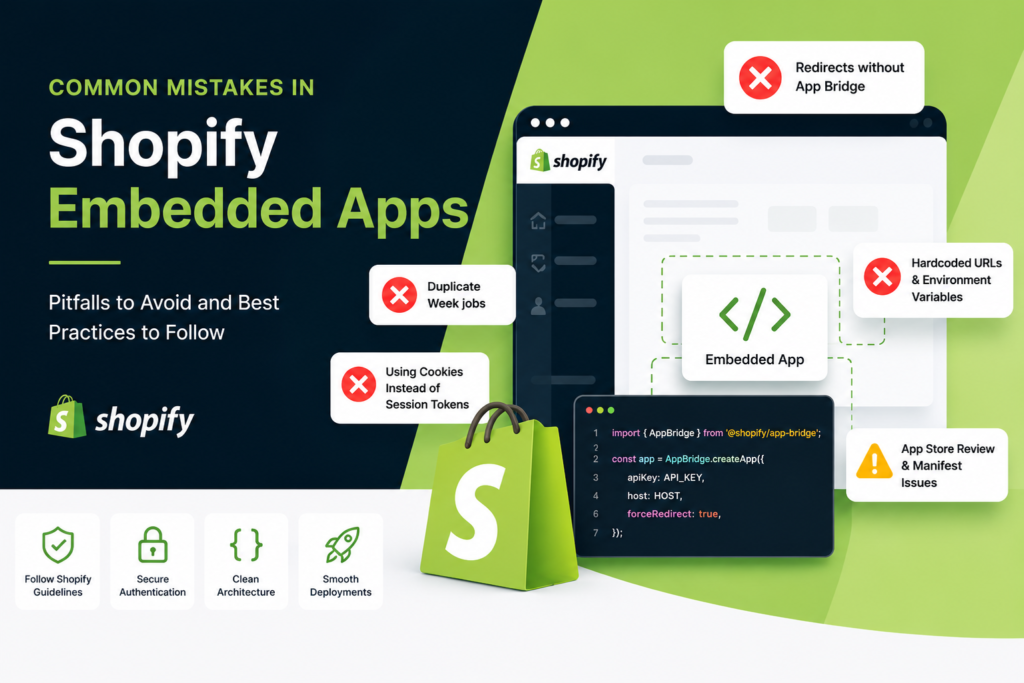
1. Using Normal Redirects Instead of App Bridge
One of the first problems many Shopify developers run into involves navigation.
If you’re coming from a traditional web development background, using window.location.href or a server-side redirect feels completely natural. Unfortunately, those approaches don’t work the same way inside an embedded Shopify app.
The Mistake
Many developers try to redirect merchants using standard browser navigation methods when sending users to:
- the billing page
- the OAuth flow
- another part of Shopify
- subscription approval screens
Although the code looks perfectly valid, browsers see it very differently because the application is running inside a sandboxed iframe.
What Happens?
Instead of navigating successfully, the browser blocks the request.
You might see errors such as:
- Console sandbox restriction errors
- Frame ancestor violations
- Blocked navigation messages
- OAuth redirect failures
These issues often appear during development, leaving developers thinking there’s something wrong with Shopify’s authentication flow when the real problem is the redirect method itself.
The Correct Approach
The solution is simple: let Shopify App Bridge handle navigation.
App Bridge is specifically designed for embedded apps and knows how to safely perform top-level navigation without violating browser security rules.
If you’re using App Bridge v4, include the App Bridge script in your document head and allow Shopify to automatically intercept supported navigation events.
As a rule of thumb:
- Don’t use window.location
- Don’t use window.top.location
- Let App Bridge manage navigation whenever you need to leave the iframe
It saves a lot of debugging time and keeps your app aligned with Shopify’s recommended architecture.
2. Registering Webhooks in Multiple Places
Webhook registration is another area where developers often overcomplicate things.
Many developers assume it’s safer to register webhooks in multiple places to make sure they exist. Ironically, that extra effort often creates more problems than it solves.
The Mistake
A common pattern is defining webhook subscriptions inside shopify.app.toml while also registering the same webhooks programmatically during server initialization.
At first glance, this seems harmless.
In reality, you’re asking Shopify to create the same subscriptions twice.
What Happens?
Duplicate webhook registrations can lead to:
- The same webhook is being delivered multiple times
- Duplicate database updates
- Increased API traffic
- More difficult debugging
- Unnecessary server load
If you’ve ever wondered why an order webhook seems to execute twice, duplicate registrations are often the culprit.
The Correct Approach
Stick to a single source of truth.
For modern Shopify apps, shopify.app.toml should handle webhook declarations, while the Shopify CLI manages registration automatically.
This keeps your configuration cleaner, avoids duplicate events, and makes deployments much easier to maintain.
3. Using Cookies Instead of Session Tokens
Authentication inside embedded apps is very different from authentication in a normal web application.
This is another area where developers coming from Express, Laravel, Rails, or other frameworks often get caught off guard.
The Mistake
Many applications still rely on:
- Cookie-based sessions
- Express session middleware
- Browser cookies
- Local authentication state
These approaches work perfectly well for standalone websites.
However, inside an embedded Shopify app, they quickly become unreliable.
Why It Breaks
Modern browsers have become increasingly strict about third-party cookies.
Safari’s Intelligent Tracking Prevention (ITP), along with similar privacy protections in other browsers, often prevents embedded applications from consistently accessing those cookies.
The result?
- Merchants unexpectedly get logged out
- Sessions become invalid
- OAuth loops occur
- Authentication randomly fails
These issues are especially frustrating because they might only appear in certain browsers or devices.
The Correct Approach
Instead of relying on cookies, Shopify recommends using App Bridge Session Tokens.
Your frontend requests a fresh JWT from App Bridge and sends it with every authenticated request. Your backend validates that token before performing any Shopify API operations.
It’s a much more reliable approach and works consistently across modern browsers.
4. Hardcoding URLs and Environment Variables
This is one of those mistakes that usually doesn’t show up until someone else starts working on the project—or until you deploy to production.
Everything seems fine during local development, but suddenly, authentication starts failing.
The Mistake
Developers sometimes hardcode values such as:
- ngrok URLs
- callback URLs
- localhost addresses
- API credentials
- application URLs
directly into the application.
It works…until those values change.
Why It Causes Problems
Development environments rarely stay the same.
Tunnel URLs change.
Developers switch machines.
Staging environments differ from production.
As soon as one of those values changes, authentication and installation flows begin to fail.
The Correct Approach
Keep environment-specific values inside environment variables and initialize your application from a central configuration.
Let Shopify CLI manage generated configuration wherever possible.
Doing so makes deployments much smoother and prevents those frustrating “it works on my machine” situations.
5. Ignoring Shopify App Store Review Requirements
Even a technically perfect app can be rejected during App Store review if it doesn’t follow Shopify’s listing guidelines.
Many developers spend weeks building great software only to get delayed because of small metadata issues.
Here are a few of the most common ones:
- Using “Shopify” in the public app name or tagline
- Having different app names in the Partner Dashboard and App Store listing
- Mentioning pricing outside Shopify’s official Pricing section
These may seem like minor details, but they’re easy reasons for a reviewer to request changes before approving your app.
Taking a few extra minutes to review your listing before submission can save days—or even weeks—of back-and-forth during the approval process.
Lessons We’ve Learned Building Shopify Apps at Techwishes Solutions
At Techwishes Solutions, we’ve built and maintained Shopify themes, custom apps, and embedded applications for merchants and agencies across different industries. Like many development teams, we encountered our share of challenges in the early stages—whether it was handling iframe navigation, debugging authentication issues, managing webhook registrations, or ensuring smooth deployments across multiple environments.
Each challenge became an opportunity to improve our engineering practices. Over time, we’ve refined our development workflow by following Shopify’s latest architectural guidelines and recommended best practices. Today, every Shopify app we build is designed with scalability, security, and maintainability in mind.
Our team follows Shopify’s official development standards, including proper App Bridge implementation, Session Token authentication, centralized webhook configuration, secure environment management, and App Store compliance requirements. By adhering to these best practices from the beginning of every project, we’re able to minimize production issues, simplify deployments, and deliver reliable applications that provide a seamless experience for merchants.
As Shopify continues to evolve its platform, our engineers stay up to date with the latest APIs, developer documentation, Shopify Editions announcements, and platform changes. This allows us to build modern Shopify applications that are future-ready, easier to maintain, and aligned with Shopify’s evolving ecosystem.