
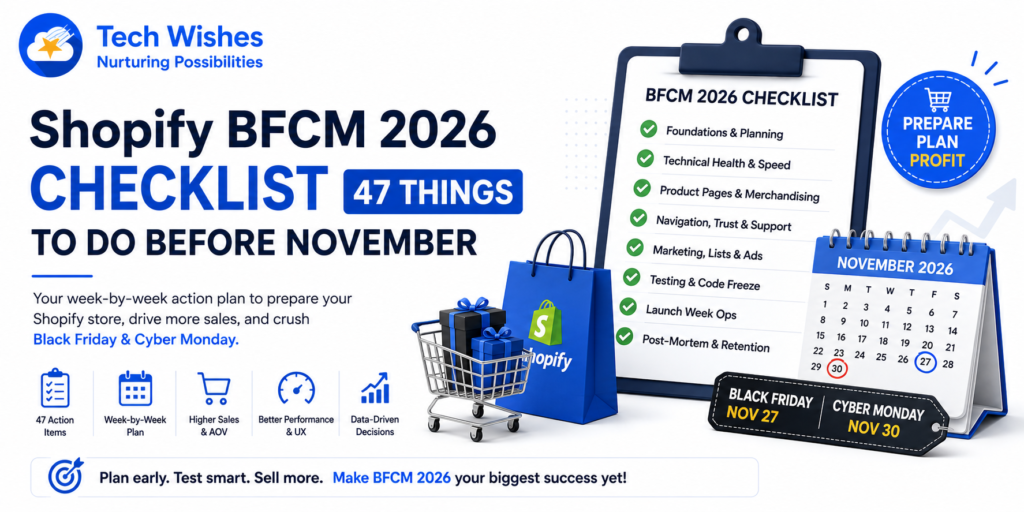
Black Friday 2026 falls on Friday, 27 November, with Cyber Monday on Monday, 30 November. That looks far away in September. It is not. The work that decides how your store performs over that weekend gets done in the eight weeks before it — and almost none of it can be done in the last fortnight, because by mid-November your theme should be frozen, not under construction.
This Shopify BFCM checklist is the list we actually run for merchants. It has 47 items, grouped into nine areas, and each one is tagged with the week you should be doing it. Some items take ten minutes. Some take a sprint. None of them are filler.
A note on how to use it: don’t try to do all 47 in one week. Work top to bottom. The foundations and speed sections come first for a reason — a beautiful product page on a store that takes eight seconds to load on 4G is a beautiful product page nobody sees.
Your BFCM 2026 timeline at a glance
| Window | Focus | Checklist items |
| Early September | Data review, planning, offer strategy | 1–6 |
| Mid–late September | Technical health, speed, apps audit | 7–12 |
| Early October | Product pages, merchandising, AOV | 13–24 |
| Mid October | Navigation, trust, support, mobile | 25–38 |
| Late October | Marketing, lists, retention, ads | 39–43 |
| 1–20 November | Testing, soft launch, code freeze | Re-run 7–12 |
| 21–30 November | Launch week ops and monitoring | 44–46 |
| December | Post-mortem and retention | 47 |
Part 1: Foundations and planning (do this first)
1. Pull last year’s BFCM data before you plan anything
Open Shopify Analytics and set the date range to 24 November – 4 December 2025. Write down five numbers: total sessions, conversion rate, average order value, revenue by traffic source, and revenue by device. Every decision below should be aimed at whichever of those numbers was weakest. Planning without this step is guessing with a spreadsheet.
2. Set a target you can actually break down
“Double last year” is not a plan. Take your target revenue, divide by your realistic AOV, and you have an order count. Divide that by your conversion rate and you have the sessions you need. Now you know whether your problem is a traffic problem or a conversion problem — and this checklist splits neatly along that line.
3. Decide your offer structure now, not in November
Sitewide percentage off, tiered spend thresholds, bundles, gift-with-purchase, or early access for subscribers. Pick one primary mechanic and at most one secondary. Merchants who run five overlapping offers spend BFCM weekend answering support tickets about which discount applies instead of selling.
4. Check your margin at the discounted price
Run your top 20 SKUs through a simple sheet: cost, shipping, payment fees, discount, ad spend per order. If a hero SKU is loss-making at 40% off, either exclude it or make it the anchor of a bundle. Discovering this on 28 November is expensive.
5. Confirm inventory and set your oversell rules
Talk to suppliers in September, not October. For anything you can’t restock, decide in advance whether you’ll allow backorders, show low-stock messaging, or hide the product. Then make sure the setting in Shopify actually matches that decision.
6. Write your shipping cutoff dates and put them somewhere visible
Get delivery-by dates from every carrier you use, domestic and international, and turn them into plain sentences: “Order by 15 December for delivery before Christmas.” These dates belong on your product pages, in your cart, in your footer, and in your FAQ — not buried in a policy page.
Part 2: Technical health and site speed
7. Run a mobile Page Speed test on your three most important pages
Test the homepage, your best-selling product page, and your main collection page — on mobile, not desktop. Mobile is where the majority of BFCM traffic lands and where slow stores lose money. Note your Largest Contentful Paint and Cumulative Layout Shift now so you can prove the fixes worked.
8. Audit every app you have installed and uninstall the dead ones
Open your app list and be honest about which ones you actually use. Uninstalled apps often leave script tags and theme code behind, so after removing an app, check your theme files for orphaned code. Every leftover script is load time you’re paying for with no return.
9. Compress and correctly size your images
Hero banners exported at 4000px wide are the single most common speed problem we find. Serve appropriately sized images, use modern formats, and make sure below-the-fold images are lazy loaded. This is usually the biggest speed win available for the least effort.
10. Test your store at realistic traffic volumes
If you’re expecting ten times your normal traffic, your third-party integrations — reviews, personalisation, chat — are the things that buckle, not Shopify itself. Load the site with every app enabled and watch what happens on a throttled connection.
11. Check that your theme is on a supported, recent version
If you’re several versions behind on a Shopify-supported theme, upgrade in September or accept that you’re staying on it through BFCM. Do not attempt a theme upgrade in November. If you’re on a heavily customised legacy theme, at minimum confirm it has no console errors on the checkout path.
12. Verify tracking end to end before you spend on ads
Place a real test order and confirm it appears correctly in GA4, Meta, and any other platform you’re running. Check that server-side tracking is firing and that consent banners aren’t silently blocking your pixels. Broken attribution during BFCM means you’re optimising ad spend on fiction.
Part 3: Product pages that convert
13. Rewrite the first 200 pixels of your top 10 product pages
BFCM traffic is colder than your usual traffic — a lot of it arrives from an ad, having never heard of you. Above the fold you need: what it is, who it’s for, the price, the saving, and the primary action. Everything else can wait.
14. Add video to your best sellers
Static images explain what a product looks like; video explains what it’s like to own. Shoppable video and UGC clips also give cold traffic a reason to stay on the page long enough to convert. Glow Videos adds shoppable video galleries, stories, and video cards to your storefront with no impact on page speed — which matters enormously in a month where every other addition is slowing you down.
15. Show before-and-after proof where the product justifies it
Skincare, haircare, home renovation, cleaning, fitness, restoration — anything with a visible transformation converts better when the buyer can drag a slider and see it themselves. Compare Star adds before/after image comparison sliders to product pages, which is a far stronger trust signal than a paragraph of copy claiming the same thing.
16. Add a size chart to every apparel and footwear product
Sizing uncertainty is the number one reason apparel carts get abandoned, and the number one reason BFCM orders come back as returns in January. Sale Star handles size charts and urgency nudges in one place, so you reduce returns and create scarcity messaging without stacking two more apps onto the page.
17. Add urgency that is actually true
Low stock counts, “12 people viewing this,” and countdowns work — until a customer notices the number never changes. Use real inventory data and real deadlines. Fake urgency during BFCM, when shoppers are comparing five stores at once, reads as amateurish.
18. Strengthen your product page merchandising blocks
Cross-sells, size guides, delivery estimates, sticky elements, and tabbed content all belong on a BFCM product page — but bolted on carelessly they wreck your layout on mobile. PDP Star bundles the product page enhancements that lift AOV into a single app, which keeps your page weight and your theme edits under control.
19. Bring back what shoppers already looked at
BFCM shoppers browse a dozen products, leave, and come back later — often from a different device. A recently viewed row gives returning visitors an instant path back to the thing they nearly bought. View Star adds a personalised browsing history section to your storefront, and it’s one of the cheapest AOV wins on this list.
Part 4: Cart, checkout and average order value
20. Make your cart do more than list items
The cart is the highest-intent surface on your store and most themes treat it as a receipt. A slide-out cart with a free shipping progress bar, upsells, and a visible discount summary is worth more than another traffic channel. Boost My Cart turns the default cart into a conversion surface with smart cart drawer features, progress incentives, and in-cart offers.
21. Set a free shipping threshold above your current AOV
If your AOV is ₹1,800, set the threshold at ₹2,200 and show a progress bar. Shoppers reliably add an item to close the gap. Setting the threshold below your AOV just gives away shipping margin on orders you were already going to get.
22. Test your discount codes on real scenarios
Test combined discounts, minimum spend, excluded collections, and expiry. Then test what happens when a customer enters a code your automatic discount already beats. Discount logic failures on Black Friday morning are the fastest way to lose a day of revenue.
23. Review checkout for friction and add urgency where allowed
Enable express payment options, check that your address autocomplete works, and remove any optional field you don’t genuinely need. If you’re on Shopify Plus, use checkout extensions rather than legacy customisations.
24. Configure abandoned cart and checkout recovery flows
Set your first abandoned checkout message to send within an hour during BFCM — the normal multi-hour delay is far too slow when the offer expires Monday night. Write BFCM-specific copy that names the deadline rather than reusing your evergreen sequence.
Part 5: Navigation, structure and SEO
25. Build a dedicated BFCM landing page and publish it in October
Create the URL now (for example /collections/black-friday), publish it early with a “deals drop soon” message and an email capture, and let it accumulate authority before the traffic arrives. Publishing it on 26 November means Google has never seen it.
26. Add breadcrumbs to every product and collection page
Breadcrumbs give shoppers a one-click route back to the category when the product isn’t right, which keeps them on site instead of back on Google. They also produce breadcrumb rich results in search, which improves click-through on high-intent BFCM queries. Breadcrumb Star adds them with the correct structured data, so you get the navigation benefit and the SEO benefit from one install.
27. Simplify your main navigation for the season
Cut your menu to the categories that matter in November and add a single, visually distinct “Black Friday” entry. Deep multi-level menus that work fine in June become a liability when half your visitors are new.
28. Fix your collection filters and sorting
Cold traffic filters. If your filters are slow, missing a “price” option, or reset when someone hits back, you’re losing browsers before they reach a product. Test filtering on mobile specifically.
29. Add a back-to-top control on long collection and product pages
BFCM collection pages get long, and on mobile a shopper who scrolls through 60 products has no way back to the filters without a lot of thumb work. Widget Star adds a back-to-top button alongside a WhatsApp chat entry point — small additions that meaningfully reduce friction on long pages.
Part 6: Trust, support and objection handling
30. Put trust signals where the hesitation happens
Payment badges, guarantee icons, return-window labels, and shipping promises belong next to the add-to-cart button, not stranded in the footer. Trust Star lets you place badges and labels on product pages where they answer the objection at the moment it forms.
31. Answer your top objections on the page, in an accordion
Every store has the same five questions: sizing, shipping time, returns, authenticity, and whether the discount stacks. Answering them inline stops customers leaving to find out. FAQ Star adds FAQ accordions to product and landing pages — and a well-marked-up FAQ block can also earn you extra real estate in search results.
32. Publish a BFCM-specific returns and exchange policy
Extended holiday return windows reduce purchase anxiety measurably. Decide your window, write it in one sentence, and repeat it on the product page, in the cart, and in your order confirmation email.
33. Set up a live chat or WhatsApp support route
Pre-purchase questions during BFCM are time-sensitive: a shopper who can’t get a sizing answer in five minutes buys elsewhere. If you’re selling in India, the Middle East, or Southeast Asia, WhatsApp will outperform every other channel — Widget Star puts a direct WhatsApp chat entry point on every page for that reason.
34. Write your support macros in advance
Draft ten canned replies now: where’s my order, discount not applying, sold out, sizing, delivery cutoff, return request, price adjustment, payment failed, wrong address, cancel order. Your BFCM weekend support load is a solvable problem in October and an unsolvable one in November.
Part 7: Mobile experience
35. Complete a full purchase on your own phone
Not a simulator. Your actual phone, on mobile data, from an ad click through to order confirmation. Do it on iOS and Android. Almost every store has at least one mobile bug that desktop testing never surfaces.
36. Keep add-to-cart reachable while scrolling
On mobile, the add-to-cart button scrolls out of view within a second and shoppers rarely scroll back for it. Sticky Star keeps a sticky add-to-cart bar pinned as the shopper reads reviews and specs, so the purchase is always one tap away.
37. Check tap targets, font sizes and pop-up behaviour
Buttons under 44px, body copy under 16px, and pop-ups that can’t be dismissed on a small screen all cost conversions. Pay particular attention to any pop-up that fires on a device where the close button lands off-screen.
38. Consider a mobile app for your repeat customers
If a meaningful share of your revenue comes from returning customers, BFCM is the best acquisition moment of the year to move them to a channel you own — push notifications cost nothing per send and land where email doesn’t. Shop App Builder turns your Shopify store into a native mobile app without code, which makes this a realistic October project rather than a six-month one.
Part 8: Marketing, traffic and retention
39. Grow and clean your email and SMS lists in September and October
Run list growth now: exit intent, early-access sign-ups, post-purchase capture. Then clean the list — remove hard bounces and long-term unengaged contacts before you send high volume, because deliverability problems in November are effectively unfixable in November.
40. Build your announcement bar and countdown before launch week
A promo bar with a live countdown is the highest-visibility, lowest-effort urgency tool you have, and it needs to be scheduled rather than manually swapped at midnight. Header Star handles promo bars and countdown timers, so you can set the sale start, the sale end, and the shipping cutoff messaging in advance and let them run.
41. Segment your email sends instead of blasting everyone
At minimum: VIPs get early access, engaged non-buyers get the main offer, lapsed customers get a win-back with a stronger hook. One email to the whole list on Black Friday morning is the least profitable version of the same work.
42. Warm up your paid campaigns in early November
Retargeting audiences and creative need time to exit the learning phase. Start prospecting campaigns in the first fortnight of November so that BFCM week is a budget increase on proven creative, not a cold start at peak CPMs.
43. Dress the store for the season
Seasonal theme touches — colour, badges, animated details — signal “there’s something happening here” to a first-time visitor in about half a second. Cursor Star lets you swap in a branded custom cursor for the campaign period, which is a small, reversible way to make a sale feel like an event on desktop.
Part 9: Launch week and after
44. Freeze your code by 20 November
No theme edits, no new apps, no “quick fixes” after this date except genuine bugs. Take a full theme backup and export a duplicate. The rule exists because the highest-risk change you can make is the one you make under time pressure on the day.
45. Build a monitoring routine for the weekend
Decide in advance who checks what and how often: real-time sessions, conversion rate versus yesterday, inventory on hero SKUs, support queue depth, ad spend pacing. Put it on a single dashboard and assign owners by shift.
46. Prepare your sold-out and sale-ending sequences
Write the “back in stock soon” email, the “last 6 hours” send, and the “sale extended” contingency before the weekend. These are the highest-converting messages of the entire period and they’re always written badly at 11pm on Cyber Monday.
47. Run a post-BFCM review in the first week of December
Compare against the numbers from item 1. Log what broke, what converted, which app earned its keep, and which offer produced the best margin — not the best revenue. Then set up your December retention flows, because the customer you acquired at a 40% discount is only profitable on their second order.
The short version
If you only have a weekend to work on this, do these six: mobile speed (items 7–9), sticky add-to-cart (36), cart drawer and free shipping threshold (20–21), trust badges and FAQ on product pages (30–31), abandoned checkout timing (24), and the code freeze (44). They cover the largest share of the gap between a good BFCM and an average one.
Frequently asked questions
When should I start preparing for BFCM 2026?
Early September. Data review and offer planning happen in September, technical and conversion work through October, and testing in the first three weeks of November. Anything started after 20 November is risk without reward.
When is Black Friday 2026?
Black Friday is Friday 27 November 2026 and Cyber Monday is Monday 30 November 2026. Most merchants now run the promotion across the full week, starting the Monday before.
How many apps should I install before BFCM?
Fewer than you think, and none of them in November. Each app adds page weight, so install only what maps to a specific problem in your funnel, add them by mid-October, and measure the speed impact after each one.
Should I discount sitewide or run tiered offers?
Tiered offers based on spend generally protect margin better and raise AOV, while sitewide percentages are simpler to communicate and convert cold traffic more easily. Run the margin numbers on your top 20 SKUs before deciding — that calculation, not preference, should make the call.
What’s the single biggest cause of lost BFCM revenue?
Mobile site speed, followed by cart and checkout friction. Both are fixable in October and neither is fixable on the day.
Need help working through the list?
We build Shopify apps and run store optimisation for D2C brands, and we’ve spent several BFCM seasons on the other side of this checklist. If you want a second pair of eyes on your store before November — a speed audit, a conversion review, or help implementing any of the 47 items above — get in touch us.
You can also browse all 14 of our Shopify apps on the App Store. Most have a free plan, so you can test them well before your code freeze.